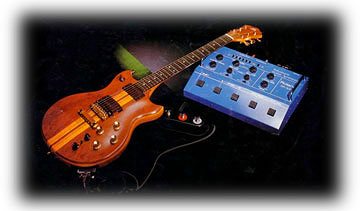
 Hi everyone. Here is a GR-300 guitar synth patch for Europa. No breath control added, but I had a sample of a GR-300 and replicated the waveform as best I could in the envelope section, then added some delay and reverb. Instant Pat. Have fun. I'll be posting more patches in the coming weeks, and I hope you like them. 
1 Comment
There is a new group from Germany that is making waves - the EW-4 Electronic Wind Quartet. You can find out a lot about them at their website. They all come from European saxophone and classical composition backgrounds. The music reflects this background. It is adventurous, sometimes dissonant, and unlike anything you have heard before. The idea of a quartet of EWI instruments is certainly innovative and opens up many possibilities for expression. This quartet is pushing wind controllers into new directions. I hope they continue their success! There is a new Midi harmonica created by Erik Lekholm called the DM48. It is an amazing instrument that looks and plays like a normal chromatic harmonica, but since it is a Midi instrument, the player has access to a huge range of sounds. Harmonica virtuoso Brendan Power has uploaded two demo videos using the DM48 and playing sounds from Analog Dreams and Acoustic Electro Waves. Check our french jazz harmonica virtuoso Laurent Maur playing it. Laurent's Facebook page is: https://www.facebook.com/laurent.maur
Go to the DM48 website for more info and contacts: http://www.lekholminstruments.com/  There is a new YouTube channel called Tomkat Jazz from Troels Busk-Jepsen. The channel features some great EWI playing. If you are into EWI, go over to the site, check out some videos and get some inspiration. You may even hear some EWI sounds from EWI Reason Sounds!
Thanks Troels, for sharing your talent with us! TomKat Jazz (YouTube) EXP1Hello everyone, we are extremely pleased to announce the release of the EXP-1 CV/Expression Processor for Reason. This is a brand new Rack Extension created with wind controller players in mind. It accepts breath, aftertouch, mod wheel, and expression. You then use the controls on the front of the device to add a response curve, smooth the attack or decay of the signal, or increase or decrease the gain of the signal. You use one of six CV outputs to route this signal to the device in your Reason rack that you are controlling.
We've been playing with this for about a year now, and the ease with which you can create great playing EWI patches that 'feel' good to play is astounding. The EXP1 even comes with over 20 combinator patches lovingly crafted for use with wind controllers. Check out the new EXP1 Rack Extension on the Propellerheads store, or over on our sister site - Amaloo Studio. 
We are pleased to announce a new EWI ReFill for Reason 6 and above! These are based on the same architecture as Analog Dreams, but we have kicked it up a notch with the addition of acoustic waveforms.
Most patches contain a mix knob that lets you cross fade between the acoustic and electronic waveforms. Most patches are actually 2 in 1! We are real proud of some of the sounds here. We have everything from mystical flutes, to fat brassy leads, to Brecker inspired layered patches that are sure to knock your socks off! You get 23 combinator patches. There are also around 40 electronic NN19 patches and 28 acoustic NN19 patches specially made for the combinator so you can mix and match sound. A user guide is included. Find out more or get it from the Ewi Reason Sounds Store. Hope you like it! In this post I thought I would highlight some of the free stuff you can find on the web. 
First up is the Analogue Monsters Free Edition. This is great sample bank containing source material from a bunch of classic synths including: • Alesis Andromeda A6 • Korg Mono/Poly • Korg MS-20 • Korg Poly800 MKII • Moog Prodigy • Roland Juno-60 • Roland Jupiter 4 • Studio Electronics SE-1X • Waldorf Microwave XT I liked the Free Edition so much that I bought the full Analog Monsters ReFill. It is probably one of my favorite ReFills. It even has a great selection of Oberheim synth samples. If you are looking to get that authentic Oberheim sound (think Matrix-6, OB-8, and OB-X, it is pure joy.  I mention this refill all the time because it is one of my favorites, both in breadth and depth, the Massive Synth Refill from exode. Too many patches to go into detail, just get it. The link takes you to the Propellerheads free refill page. Just scroll down until you find it.  Did you know that the NN-XT can load sound fonts? This is really cool because there are a ton of free sound fonts you can download. One of my favorite spots is sf2midi.com. The sounds are pretty well organized and with a little hunting and pecking (we are talking about free here, after all) you can sometimes find some pretty good samples. Obviously, they will not be at the same quality level of a sample bank you buy, but every once in a while you can stumble on something really good. I've found some flute and blown pipe sounds that layer well with other sounds. So there you have it, three ways to expand your sound palette for free. Do you have any favorite web sites for free stuff? Let us know in the comments.
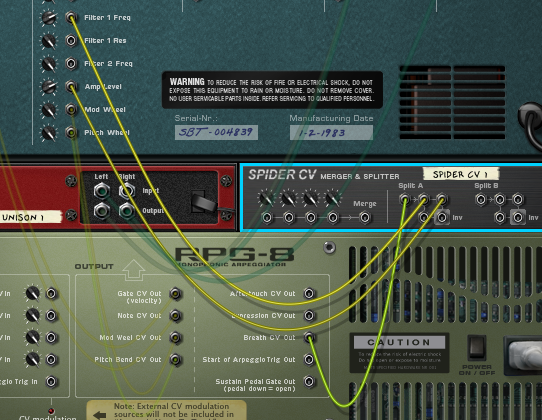
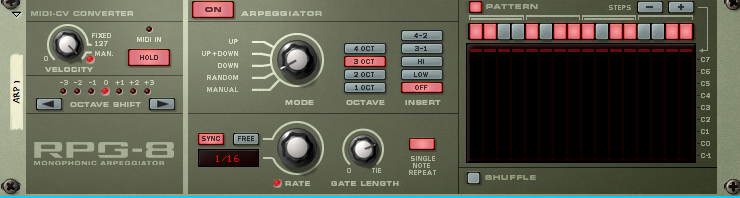 I was recently asked how to go about playing arpeggios with an EWI - based combi. I thought I would explore this topic in a little more detail. We all know that you can use an RPG-8 with a keyboard to create arpeggios, but we face a unique set of challenges when playing with a wind controller. The RPG-8 (and Matrix for that matter) works by 'playing' the synth you hook it up to. When playing a keyboard, you find your device, right click on it, select RPG-8 from the menu and the RPG-8 is created with everything auto routed. The thing to remember is that you are not playing the first device any more. The RPG-8 is playing the device and you are playing the RPG-8. 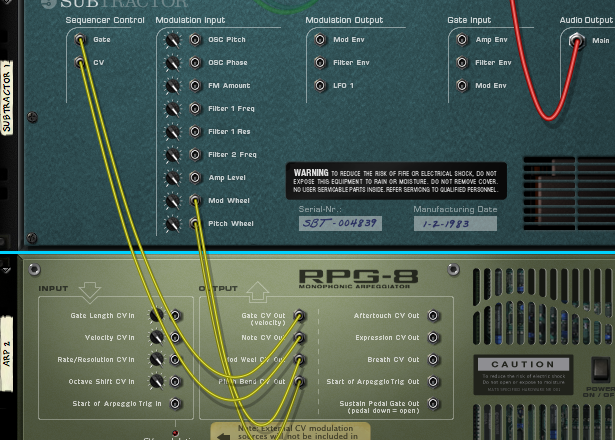 As you can see in this screen shot, the RPG-8 is taking over playing the Subtractor device via the Gate and Note CV inputs. And this works great, no problem. But what happens when we hook up the RPG-8 to an EWI combi (say, from Analog Dreams)? 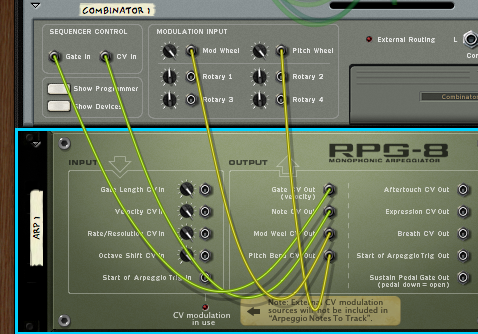 As you can see the Gate and Note CV are wired up and the Mod Wheel and Pitch Wheel are routed. To play this we need to select the RPG-8 in the Sequencer, not the Combinator. 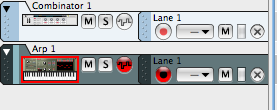 RPG-8 is selected At this point we have two issues:
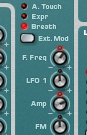
Routing Breath ControlThere are many ways to route breath control to the combinator and which one you use depends on how the combinator is wired up for breath. 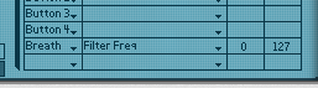 If the combi programmer is being used to send breath info to parameters: 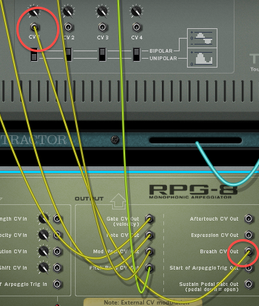 1. Flip the rack around and route 'Breath' from the RPG-8 to CV input 1 of the combi.  2. Change 'Breath' in the Combi programmer to CV in 1. That's it. If you are using the front panel controls on a device, you need to use the CV inputs instead.
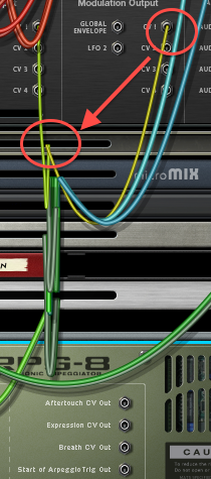
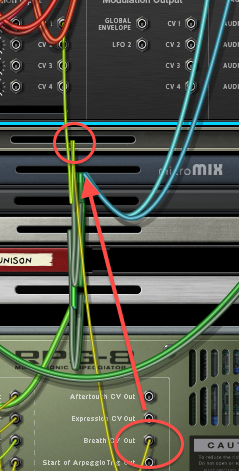
If you are using a more intricate combinator setup, such as from 'Analog Dreams', you need to find a place to intercept the normal breath data in the combinator and insert the breath data from the RPG-8.  In this case the breath data starts at the Thor device and is routed to CV out 2, so all we need to do is take move the connection from CV out 2 on the Thor to the Breath out on the RPG-8:
So there you have it. This setup will let you play repeated notes in octaves with your wind controller. With a little bit of snooping around and rerouting, you can play your breath controlled sounds with the RPG-8. Just remember - the trick is to 'play' the RPG-8, and let that play the breath controlled device.
In a later post we will explore the step sequencer on Thor and use that to create true arpeggiated patterns that will play our other breath controlled devices. Until then, have fun and be musical.  Longtime EWI artist Barry Caudill was kind enough to write review of our new mini pack - Analog Dreams. "I’ve been playing EWI and other wind synths for many years and I have done a lot of acoustic instrument emulations over the years but I’ve always preferred synth sounds for leads and solos because it’s really hard to be super creative and emulative at the same time. Synth patches free me up to just play. Because of that I am really happy with this collection of sounds. Chris’s patches are always very expressive and easy to play and these sounds take that concept to a new level. Another great thing about the package is that all of the patches are “tweakable” whether it’s changing the filters, adding effects, or adjusting the relative brightness of the patch. Chris sets up each Combinator with knobs and buttons that are readily available and easy to understand. You can even assign controllers to the knobs and buttons to make it easier to do while playing." "All of the sounds are very usable and there are no “clunkers” in the bunch." I poked around Barry's blog and found a lot of great posts about playing the sax, sax equipment and gigging that I found very insightful. I particularly liked his description of his virtual EWI rig. Check out his blog related to all things saxophone and EWI- you won't be disappointed!
And, be sure to check out our first EWI mini-pack, Analog Dreams. Barry liked it, maybe you will too. 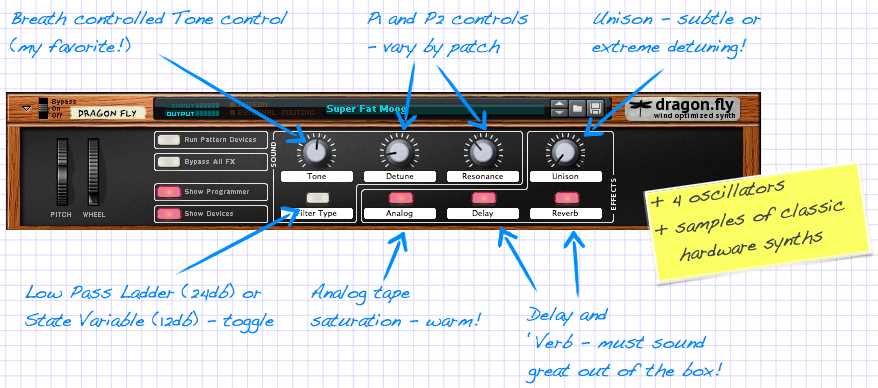
The Analog Dreams Mini Pack has finally escaped from the EWI Reason Sounds lab. This new set of sounds is sure to get your creative juices flowing, with a great sounding set of Analog style synth sounds. You're sure to love the sounds and the price! 
|
Reason ReFills
Rotator Volume 1 and Rotator Volume 2 Released!
Categories
All
Archives
March 2021
|
||||||||
 RSS Feed
All product names used are trademarks of their respective owners and in no way constitutes an association or affiliation with Ewireasonsounds.com Copyright 2010 Ewireasonsounds.com